%20scale(0.100000,-0.100000)'%20fill='%23ffffff'%20stroke='none'%3e%3cpath%20d='M1439%203393%20c-26%20-59%20-481%20-1134%20-631%20-1488%20-61%20-143%20-166%20-393%20-235%20-555%20-424%20-1000%20-543%20-1281%20-543%20-1286%200%20-3%20221%20-3%20491%20-2%20l491%203%20117%20295%20118%20295%20648%200%20649%200%20106%20-260%20c59%20-143%20114%20-277%20123%20-298%20l16%20-38%201048%204%201048%204%20125%2025%20c299%2061%20490%20156%20647%20322%2095%20100%20154%20206%20188%20339%2022%2082%2024%20109%2021%20257%20-3%20134%20-7%20179%20-25%20238%20-74%20250%20-242%20418%20-543%20542%20l-88%2037%2052%2024%20c84%2039%20168%2097%20239%20166%20l66%2064%20211%20-523%20c116%20-288%20301%20-746%20411%20-1018%20l200%20-495%20436%200%20436%200%20114%20284%20c63%20156%20116%20286%20118%20287%202%202%2056%20-126%20119%20-284%20l116%20-287%20437%200%20437%200%2037%2095%20c33%2083%20238%20593%20576%201430%2057%20140%20169%20419%20250%20620%2081%20201%20217%20538%20303%20750%2085%20212%20163%20406%20174%20433%20l18%2047%20-513%200%20-512%200%20-379%20-1055%20c-209%20-580%20-382%20-1052%20-385%20-1049%20-3%203%20-47%20121%20-98%20262%20l-92%20256%20144%20355%20c341%20847%20455%201129%20474%201179%20l21%2052%20-513%200%20-512%200%20-45%20-125%20c-24%20-69%20-45%20-123%20-47%20-122%20-1%202%20-22%2057%20-46%20123%20l-42%20119%20-523%203%20c-287%201%20-522%200%20-522%20-3%200%20-3%20142%20-357%20317%20-788%20174%20-430%20318%20-792%20321%20-804%205%20-27%20-168%20-518%20-178%20-506%20-4%204%20-148%20402%20-320%20883%20-172%20481%20-341%20952%20-374%201045%20l-62%20170%20-522%203%20-522%202%206%20-24%206%20-24%20-64%2013%20c-144%2030%20-248%2033%20-1165%2034%20l-943%201%20-2%20-587%20-3%20-588%20-97%20230%20c-53%20127%20-167%20394%20-252%20595%20l-155%20365%20-451%203%20-451%202%20-20%20-47z%20m3064%20-724%20c135%20-21%20217%20-67%20265%20-148%2024%20-40%2027%20-56%2027%20-131%20-1%20-67%20-5%20-94%20-22%20-125%20-29%20-54%20-78%20-100%20-136%20-125%20-95%20-42%20-177%20-50%20-532%20-50%20l-334%200%200%20287%20c0%20158%202%20290%205%20295%208%2012%20644%2010%20727%20-3z%20m-2421%20-802%20c98%20-248%20181%20-460%20184%20-469%206%20-17%20-16%20-18%20-365%20-18%20-204%200%20-371%203%20-371%208%20-1%2012%20365%20932%20370%20932%203%200%2085%20-204%20182%20-453z%20m2568%20-453%20c97%20-20%20148%20-43%20199%20-90%2056%20-49%2083%20-105%2089%20-179%209%20-122%20-43%20-222%20-148%20-279%20-106%20-58%20-118%20-59%20-586%20-63%20l-431%20-4%20-2%20315%20-2%20316%20403%200%20c322%20-1%20418%20-4%20478%20-16z'/%3e%3c/g%3e%3c/svg%3e)


'/%3e%3cpath%20fill-rule='evenodd'%20clip-rule='evenodd'%20d='M110.863%2022.5585L112.172%2037.5125L124.468%2028.9025L110.863%2022.5585ZM113.025%2025.6452L113.764%2034.0974L120.714%2029.2309L113.025%2025.6452Z'%20fill='url(%23paint1_linear_2858_1383)'/%3e%3cpath%20d='M68.8774%200L72.3415%206H65.4133L68.8774%200Z'%20fill='url(%23paint2_linear_2858_1383)'/%3e%3cpath%20d='M121.363%2062.8284L119.569%2069.5206L114.67%2064.6216L121.363%2062.8284Z'%20fill='url(%23paint3_linear_2858_1383)'/%3e%3cpath%20d='M19.5344%2069.1927L25.5344%2072.6569L19.5344%2076.121L19.5344%2069.1927Z'%20fill='url(%23paint4_linear_2858_1383)'/%3e%3cdefs%3e%3clinearGradient%20id='paint0_linear_2858_1383'%20x1='10.6145'%20y1='35.3974'%20x2='6.12826'%20y2='18.6547'%20gradientUnits='userSpaceOnUse'%3e%3cstop%20stop-color='%23FF455B'/%3e%3cstop%20offset='1'%20stop-color='%23FF7245'/%3e%3c/linearGradient%3e%3clinearGradient%20id='paint1_linear_2858_1383'%20x1='110.863'%20y1='22.5585'%20x2='120.805'%20y2='36.7572'%20gradientUnits='userSpaceOnUse'%3e%3cstop%20stop-color='%23FF455B'/%3e%3cstop%20offset='1'%20stop-color='%23FF7245'/%3e%3c/linearGradient%3e%3clinearGradient%20id='paint2_linear_2858_1383'%20x1='68.8774'%20y1='3.12331e-08'%20x2='68.8774'%20y2='10.6667'%20gradientUnits='userSpaceOnUse'%3e%3cstop%20stop-color='%23FF455B'/%3e%3cstop%20offset='1'%20stop-color='%23FF7245'/%3e%3c/linearGradient%3e%3clinearGradient%20id='paint3_linear_2858_1383'%20x1='121.363'%20y1='62.8284'%20x2='113.82'%20y2='70.3709'%20gradientUnits='userSpaceOnUse'%3e%3cstop%20stop-color='%23FF455B'/%3e%3cstop%20offset='1'%20stop-color='%23FF7245'/%3e%3c/linearGradient%3e%3clinearGradient%20id='paint4_linear_2858_1383'%20x1='19.5344'%20y1='69.1927'%20x2='24.8677'%20y2='78.4304'%20gradientUnits='userSpaceOnUse'%3e%3cstop%20stop-color='%23FF455B'/%3e%3cstop%20offset='1'%20stop-color='%23FF7245'/%3e%3c/linearGradient%3e%3c/defs%3e%3c/svg%3e)

Requirements and catalogue model
Agree on the assortment, attributes, variations, product data sources and sales rules.
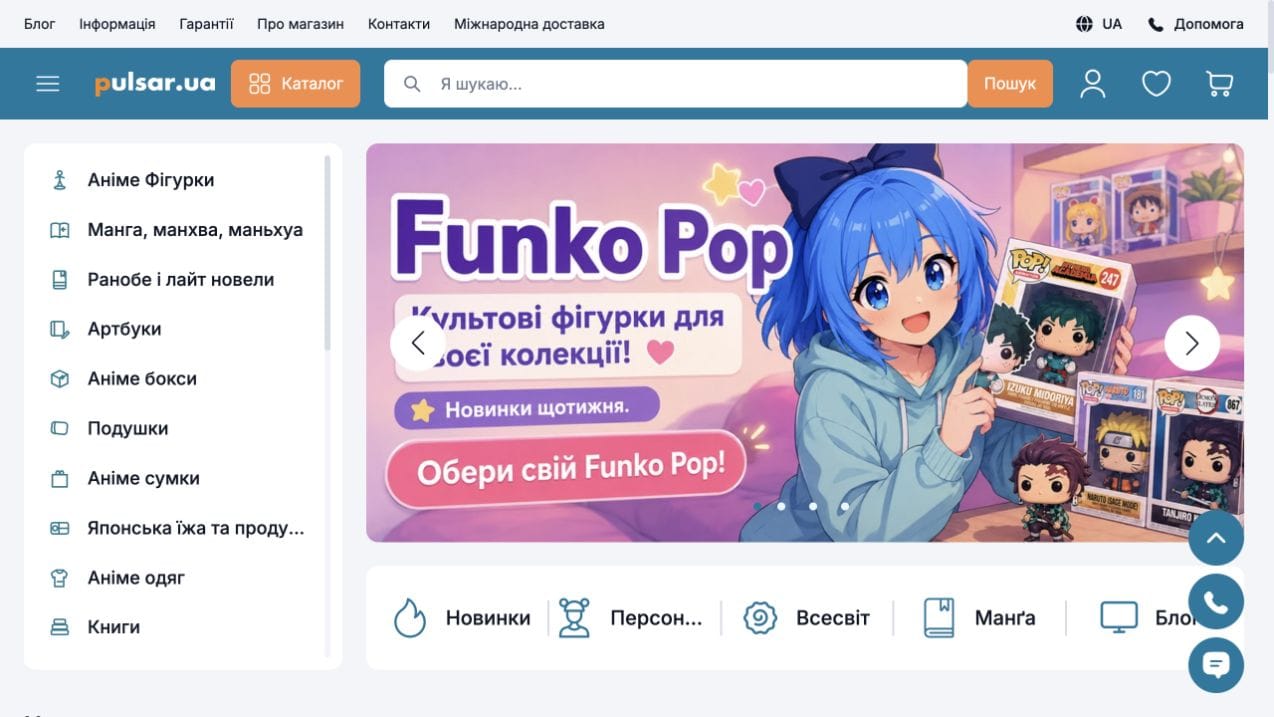



Pulsar brings together manga, collectible figures, clothing, accessories and other merchandise. The catalogue is organised around product types and customer interests. The homepage presents new arrivals, selections and blog articles, alongside links to characters, fictional universes and manga series.
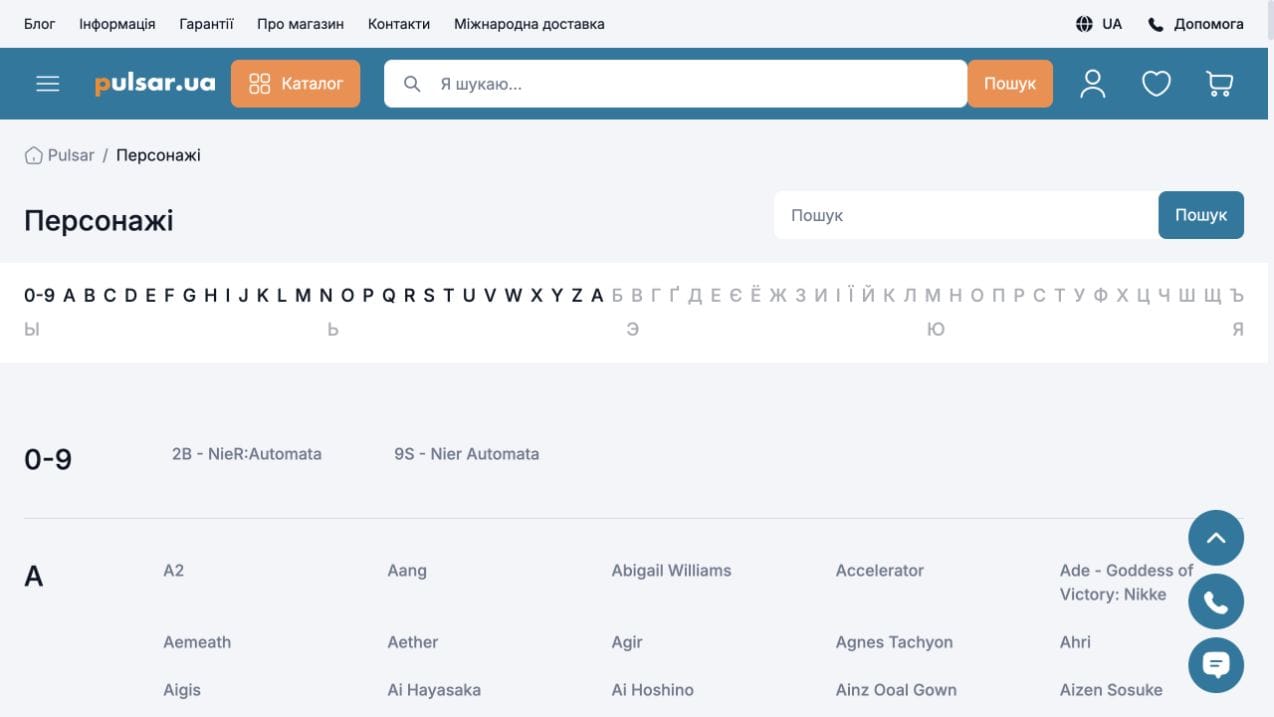
The manga catalogue includes language-based categories and franchise filters. A searchable character directory provides alphabetical navigation and links to matching products. Customers can approach the collection through a product category, a series or a favourite character.
The manga product page includes images, a description, specifications, a product code, pricing, stock status and a purchase bonus. Payment methods, domestic shipping and international delivery are presented alongside the product. The site distinguishes several availability states, including in-stock items and items supplied to order.
The public interface connects product pages with reviews, favourites and editorial articles. Thematic navigation offers several ways to explore the collection, while detailed product information helps buyers check a particular edition or collectible before purchasing.
A typical ecommerce delivery sequence. The description of this case sets out its specific functions and completed scope.
Agree on the assortment, attributes, variations, product data sources and sales rules.

Define the route from product discovery to ordering, page structure and designs.

Connect the catalogue, product pages, cart and account. Implement only the services and data exchanges included in the brief.

Check product data, variations, prices and order journeys; prepare page URLs and metadata.

Agree on deployment, access handover and subsequent improvements. Support is scoped separately.