%20scale(0.100000,-0.100000)'%20fill='%23ffffff'%20stroke='none'%3e%3cpath%20d='M1439%203393%20c-26%20-59%20-481%20-1134%20-631%20-1488%20-61%20-143%20-166%20-393%20-235%20-555%20-424%20-1000%20-543%20-1281%20-543%20-1286%200%20-3%20221%20-3%20491%20-2%20l491%203%20117%20295%20118%20295%20648%200%20649%200%20106%20-260%20c59%20-143%20114%20-277%20123%20-298%20l16%20-38%201048%204%201048%204%20125%2025%20c299%2061%20490%20156%20647%20322%2095%20100%20154%20206%20188%20339%2022%2082%2024%20109%2021%20257%20-3%20134%20-7%20179%20-25%20238%20-74%20250%20-242%20418%20-543%20542%20l-88%2037%2052%2024%20c84%2039%20168%2097%20239%20166%20l66%2064%20211%20-523%20c116%20-288%20301%20-746%20411%20-1018%20l200%20-495%20436%200%20436%200%20114%20284%20c63%20156%20116%20286%20118%20287%202%202%2056%20-126%20119%20-284%20l116%20-287%20437%200%20437%200%2037%2095%20c33%2083%20238%20593%20576%201430%2057%20140%20169%20419%20250%20620%2081%20201%20217%20538%20303%20750%2085%20212%20163%20406%20174%20433%20l18%2047%20-513%200%20-512%200%20-379%20-1055%20c-209%20-580%20-382%20-1052%20-385%20-1049%20-3%203%20-47%20121%20-98%20262%20l-92%20256%20144%20355%20c341%20847%20455%201129%20474%201179%20l21%2052%20-513%200%20-512%200%20-45%20-125%20c-24%20-69%20-45%20-123%20-47%20-122%20-1%202%20-22%2057%20-46%20123%20l-42%20119%20-523%203%20c-287%201%20-522%200%20-522%20-3%200%20-3%20142%20-357%20317%20-788%20174%20-430%20318%20-792%20321%20-804%205%20-27%20-168%20-518%20-178%20-506%20-4%204%20-148%20402%20-320%20883%20-172%20481%20-341%20952%20-374%201045%20l-62%20170%20-522%203%20-522%202%206%20-24%206%20-24%20-64%2013%20c-144%2030%20-248%2033%20-1165%2034%20l-943%201%20-2%20-587%20-3%20-588%20-97%20230%20c-53%20127%20-167%20394%20-252%20595%20l-155%20365%20-451%203%20-451%202%20-20%20-47z%20m3064%20-724%20c135%20-21%20217%20-67%20265%20-148%2024%20-40%2027%20-56%2027%20-131%20-1%20-67%20-5%20-94%20-22%20-125%20-29%20-54%20-78%20-100%20-136%20-125%20-95%20-42%20-177%20-50%20-532%20-50%20l-334%200%200%20287%20c0%20158%202%20290%205%20295%208%2012%20644%2010%20727%20-3z%20m-2421%20-802%20c98%20-248%20181%20-460%20184%20-469%206%20-17%20-16%20-18%20-365%20-18%20-204%200%20-371%203%20-371%208%20-1%2012%20365%20932%20370%20932%203%200%2085%20-204%20182%20-453z%20m2568%20-453%20c97%20-20%20148%20-43%20199%20-90%2056%20-49%2083%20-105%2089%20-179%209%20-122%20-43%20-222%20-148%20-279%20-106%20-58%20-118%20-59%20-586%20-63%20l-431%20-4%20-2%20315%20-2%20316%20403%200%20c322%20-1%20418%20-4%20478%20-16z'/%3e%3c/g%3e%3c/svg%3e)


'/%3e%3cpath%20fill-rule='evenodd'%20clip-rule='evenodd'%20d='M110.863%2022.5585L112.172%2037.5125L124.468%2028.9025L110.863%2022.5585ZM113.025%2025.6452L113.764%2034.0974L120.714%2029.2309L113.025%2025.6452Z'%20fill='url(%23paint1_linear_2858_1383)'/%3e%3cpath%20d='M68.8774%200L72.3415%206H65.4133L68.8774%200Z'%20fill='url(%23paint2_linear_2858_1383)'/%3e%3cpath%20d='M121.363%2062.8284L119.569%2069.5206L114.67%2064.6216L121.363%2062.8284Z'%20fill='url(%23paint3_linear_2858_1383)'/%3e%3cpath%20d='M19.5344%2069.1927L25.5344%2072.6569L19.5344%2076.121L19.5344%2069.1927Z'%20fill='url(%23paint4_linear_2858_1383)'/%3e%3cdefs%3e%3clinearGradient%20id='paint0_linear_2858_1383'%20x1='10.6145'%20y1='35.3974'%20x2='6.12826'%20y2='18.6547'%20gradientUnits='userSpaceOnUse'%3e%3cstop%20stop-color='%23FF455B'/%3e%3cstop%20offset='1'%20stop-color='%23FF7245'/%3e%3c/linearGradient%3e%3clinearGradient%20id='paint1_linear_2858_1383'%20x1='110.863'%20y1='22.5585'%20x2='120.805'%20y2='36.7572'%20gradientUnits='userSpaceOnUse'%3e%3cstop%20stop-color='%23FF455B'/%3e%3cstop%20offset='1'%20stop-color='%23FF7245'/%3e%3c/linearGradient%3e%3clinearGradient%20id='paint2_linear_2858_1383'%20x1='68.8774'%20y1='3.12331e-08'%20x2='68.8774'%20y2='10.6667'%20gradientUnits='userSpaceOnUse'%3e%3cstop%20stop-color='%23FF455B'/%3e%3cstop%20offset='1'%20stop-color='%23FF7245'/%3e%3c/linearGradient%3e%3clinearGradient%20id='paint3_linear_2858_1383'%20x1='121.363'%20y1='62.8284'%20x2='113.82'%20y2='70.3709'%20gradientUnits='userSpaceOnUse'%3e%3cstop%20stop-color='%23FF455B'/%3e%3cstop%20offset='1'%20stop-color='%23FF7245'/%3e%3c/linearGradient%3e%3clinearGradient%20id='paint4_linear_2858_1383'%20x1='19.5344'%20y1='69.1927'%20x2='24.8677'%20y2='78.4304'%20gradientUnits='userSpaceOnUse'%3e%3cstop%20stop-color='%23FF455B'/%3e%3cstop%20offset='1'%20stop-color='%23FF7245'/%3e%3c/linearGradient%3e%3c/defs%3e%3c/svg%3e)

Requirements and catalogue model
Agree on the assortment, attributes, variations, product data sources and sales rules.
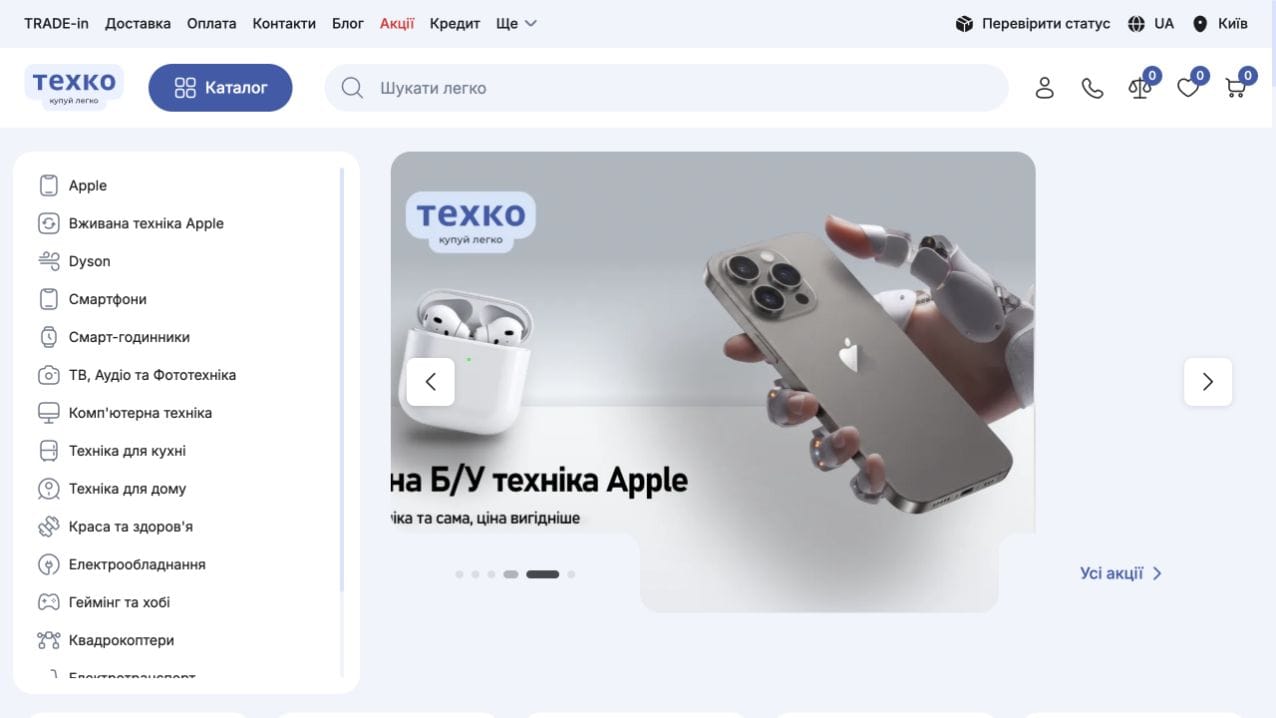


Tehko offers smartphones, computers, home appliances and accessories, with a separate section for used Apple devices. The site combines product browsing with device exchange services and purchasing information.
The iPhone catalogue provides links to device series and filters for price, storage, colour and other specifications. Product pages display images, availability, pricing and technical details. The product model includes selectors for colour, storage capacity and device version.
The product page brings together optional services, related accessories, delivery methods and payment information. Separate sections describe instalment options, warranty and returns. Customers can proceed to the cart or use a quick-order form.
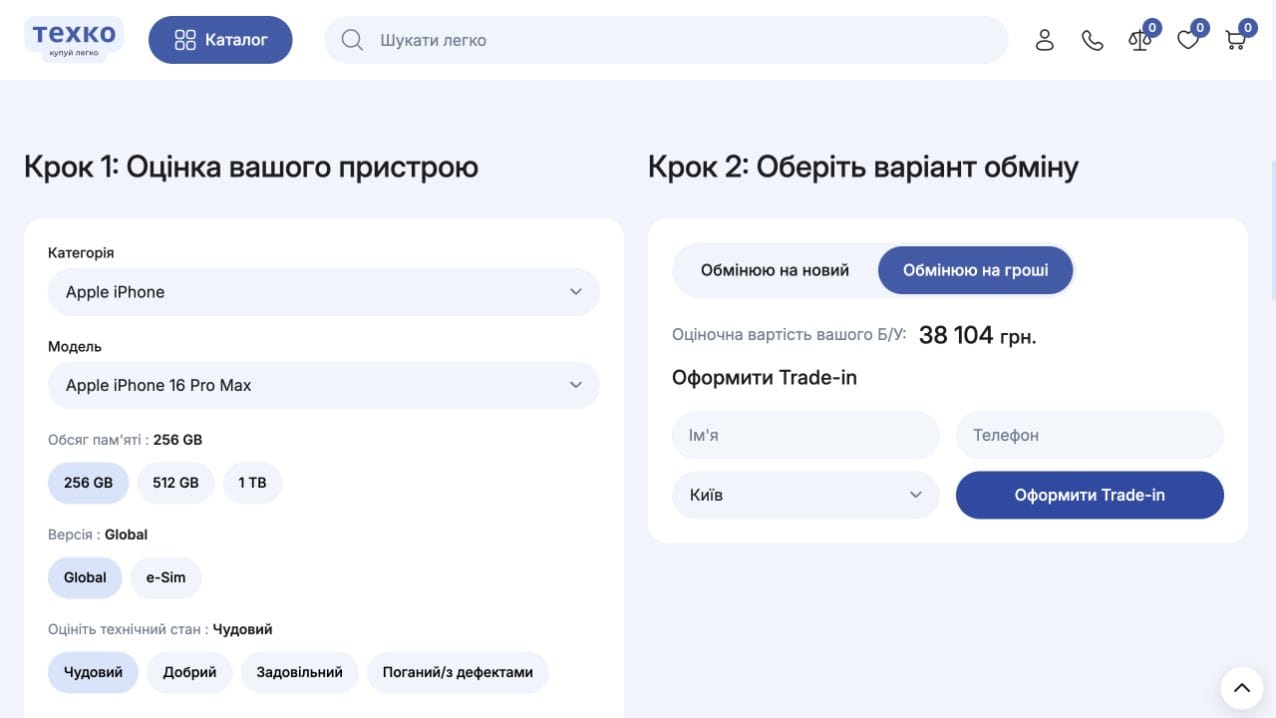
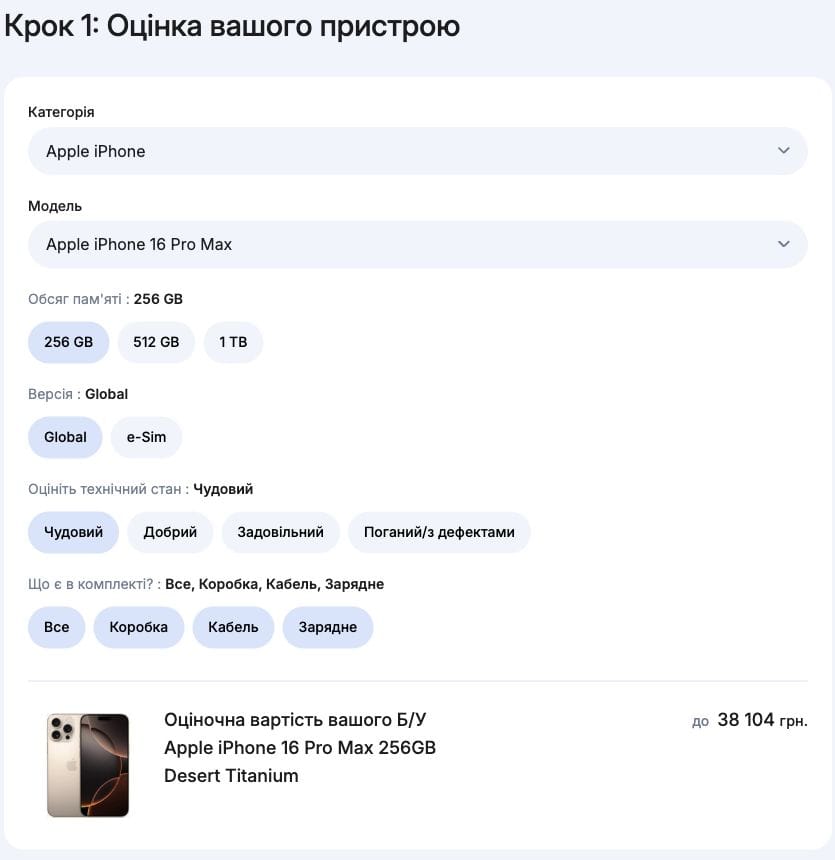
The Trade-in page presents a valuation interface based on the customer’s current device model, storage, version, condition and included accessories. It displays a preliminary estimate and options to exchange the device for a new one or for cash. This journey is also linked from the product page, connecting product selection with the option to trade in existing equipment.
A typical ecommerce delivery sequence. The description of this case sets out its specific functions and completed scope.
Agree on the assortment, attributes, variations, product data sources and sales rules.

Define the route from product discovery to ordering, page structure and designs.

Connect the catalogue, product pages, cart and account. Implement only the services and data exchanges included in the brief.

Check product data, variations, prices and order journeys; prepare page URLs and metadata.

Agree on deployment, access handover and subsequent improvements. Support is scoped separately.